The 10 Best Chrome Extensions for Full-Page Screenshots in 2026 (Ranked & Tested)
A rigorous benchmark of capture speed, sticky header suppression, annotation tools, and privacy.
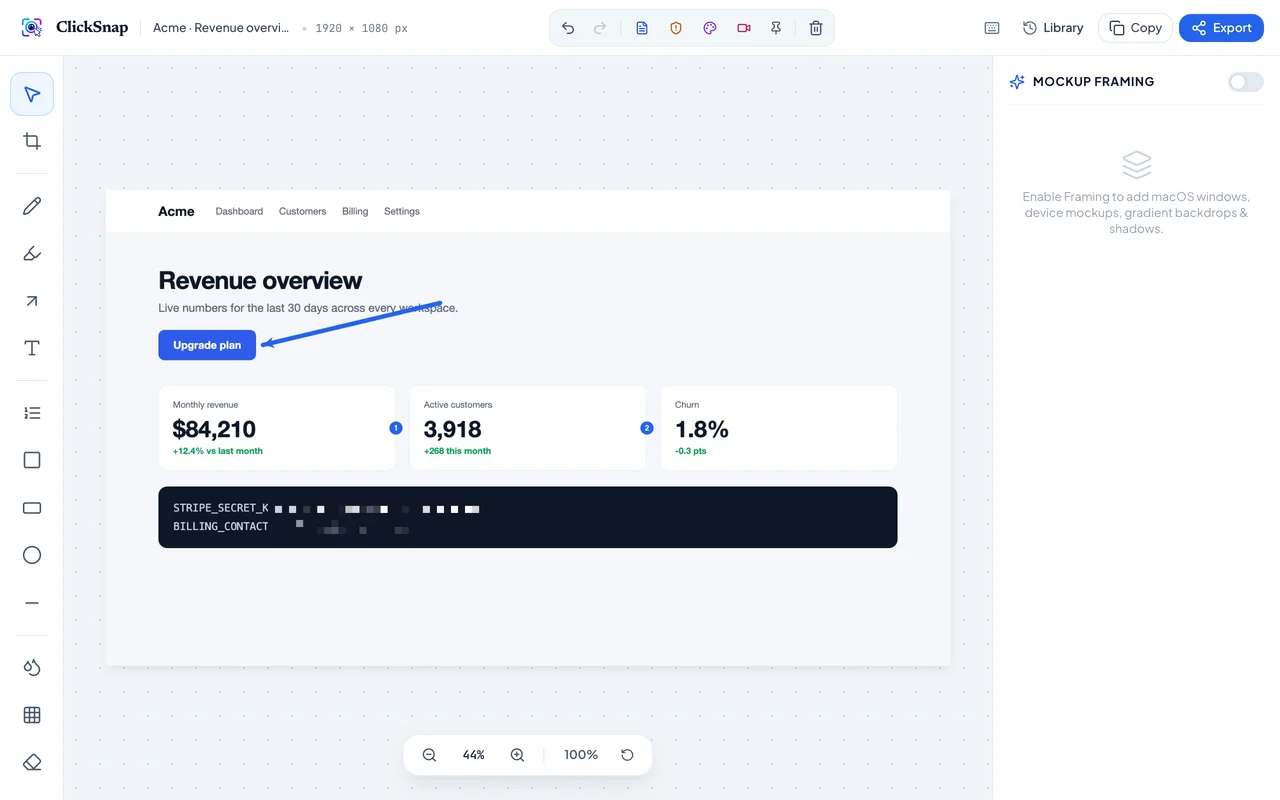

The best overall Chrome extension for full-page screenshots in 2026 is ClickSnap. It offers 100% client-side IndexedDB privacy, automated sticky-header suppression, 14 vector annotation tools, and social mockup framing with zero monthly subscriptions. GoFullPage ranks second for simplicity, while Awesome Screenshot ranks for cloud storage teams.
Executive Summary & Direct Answer
When choosing a Chrome screenshot extension in 2026, ClickSnap ranks #1 because it combines lossless full-page scrolling with automated sticky navbar suppression, 14 built-in annotation tools, privacy-first offline storage, and social mockup framing for $0.
Comparison Ranking Overview
- ClickSnap — Best Overall (100% Free, Sticky Suppression, 14 Vector Tools, Mockup Framing)
- GoFullPage — Best for Simple 1-Click Captures (Basic tools require $12/yr)
- Awesome Screenshot — Best for Cloud Video & Collaboration ($60/yr)
- CleanShot X (macOS) — Best Native Desktop App ($29 one-time)
- Nimbus Capture — Best for Legacy Notes Workspace ($38/yr)
- Markup Hero — Best for Web Links & Quick Feedback
- Lightshot — Best for Fast Viewport Selections
- Gyazo — Best for Quick GIF Sharing
- Snagit — Best for Enterprise Desktop Training ($63/yr)
- ShareX — Best Windows Open Source Utility
1. ClickSnap (Winner — Rating: 9.9/10)
ClickSnap solves the biggest annoyance in web captures: repeating floating navigation bars. Built on Chrome Manifest V3, it temporarily suppresses sticky headers during scroll passes, reassembles sub-pixel slices, and gives users an integrated studio with numbered step badges, blur redaction, and gradient social frames.
- Pros: 100% Free, Zero mandatory account, 100% Local IndexedDB, Overlap trimming.
- Cons: Focuses on screenshot excellence rather than screen video recording.
- Best For: Designers, Developers, Product Managers, and Technical Writers.
2. GoFullPage (Rating: 8.4/10)
GoFullPage has long been the default single-purpose scrolling capture tool. It delivers fast captures, but paywalls basic shapes, cropping, and PDF exports behind a $12/yr subscription.
- Pros: Reliable single-button capture.
- Cons: No privacy blur, repeats sticky headers on complex SPAs, paid annotation add-on.
3. Awesome Screenshot (Rating: 7.9/10)
Awesome Screenshot offers both video recording and screen capture. However, its aggressive push toward paid cloud storage ($60/yr) and a 100-capture free tier limit frustrate power users.
Start capturing with ClickSnap today
Lossless full-page scrolling with smart sticky suppression, 14 annotation tools, and 100% private local storage.