ClickSnap vs Top Screenshot Tools
See how ClickSnap outperforms GoFullPage, Awesome Screenshot, Snagit, CleanShot X, and 6 other screenshot extensions across features, pricing, privacy, and speed.
Comprehensive Feature Matrix (ClickSnap vs Top 6 Tools)
Side-by-side technical evaluation across capture, smart AI tools, privacy shaders, mockup framing, and pricing.
| Capability / Tool | ClickSnap | GoFullPage | Awesome Scr. | Snagit | CleanShot X | Lightshot |
|---|---|---|---|---|---|---|
| Capture & Scrolling | ||||||
Full Page Scrolling Capture Captures full-length scrolling pages from top to bottom into a single lossless image. | Partial (Buggy SPA) | Requires helper | OS Scroll (Slow) | |||
Intelligent Sticky Header Suppression Temporarily suppresses floating navbars during scroll to eliminate duplicate stitched headers. | Duplicate headers | |||||
Screen & Animated GIF Recorder Record interactive workflows and animated micro-interactions directly into WebM or GIF format. | Paid ($60/yr) | Paid ($62.99) | Paid ($29/yr Mac) | |||
Selected Area & Window Capture Precision marquee crop with crosshair dimensions and aspect ratio lock. | Paywalled | |||||
| Smart AI & Privacy | ||||||
Local OCR Text Extraction Extracts editable text and code snippets from any screenshot directly to your clipboard offline. | 100% Free & Local | Paid ($62.99) | Paid ($29/yr Mac) | |||
AI Privacy Shield Auto-Redact 1-click automated detection & irreversible blur of emails, API keys, JWTs, IPs, and card numbers. | 1-Click Auto Redact | Manual only | Manual only | Manual only | ||
Loupe Eyedropper & Color Palette Sample exact pixel hex/RGB colors with high-zoom loupe and generate 5-stop harmonious palettes. | Built-in Palette Generator | |||||
Pin-to-Screen (Floating Reference) Float captured screenshots in an always-on-top picture-in-picture window while coding or designing. | Paid ($29/yr Mac) | |||||
| Annotation Studio | ||||||
14 Vector Annotation Tools Curved arrows, bezier lines, callout boxes, highlighter brush, and numbered step badges (1, 2, 3...). | 14 Free Tools | Paywalled ($12/yr) | Limited Free | Desktop Suite | macOS Native | Basic Pixel Pen |
Sequential Step Counters (1, 2, 3...) Auto-incrementing numbered badge stamps for creating step-by-step documentation and SOPs. | ||||||
Destructive Privacy Blur Shaders Irreversible gaussian blur and pixelate shaders that permanently obscure sensitive tokens. | ||||||
| Framing & Presentation | ||||||
3D Mockup Studio & Mesh Gradients 12 curated 135° mesh gradients with dynamic padding, rounded corners, and 3D perspective tilt. | 12 Gradients + 3D Tilt | Manual templates | Basic Gradients | |||
Device Frames (macOS Safari & iPhone) Wrap captures inside photorealistic macOS Safari dark/light windows or iPhone 15 Pro shells. | macOS & iPhone Shells | macOS only | ||||
Social Canvas Presets (X, PH, Dribbble) Instant 1-click aspect ratio framing for Twitter/X (16:9), Product Hunt (1:1), and LinkedIn (4:3). | ||||||
| Security & Economics | ||||||
Data Privacy & Cloud Architecture Where your screenshots, customer data, and API keys are stored and processed. | 100% Local IndexedDB | Local / Cloud prompt | Remote Cloud Servers | Local Desktop | Local / Cloud sync | Public prnt.sc links (Risk) |
Cross-Platform Availability Operating systems supported without separate licensing or software installs. | Mac, Win, Linux, ChromeOS | Chrome / Edge | Chrome / Edge | Mac & Win ($62.99 each) | macOS Only ($29/yr) | Mac & Win |
Pricing & Subscription Fees Total cost for full unlocked feature set without hidden charges. | $0 Free Forever | $12 / Year | $60 / Year | $62.99 + $39/yr renewal | $29 / Year ($8/mo) | Free (Ad-supported) |
Explore 1-on-1 Competitor Shootouts
Select any tool below to see direct migration reasons, pricing breakdowns, and feature verdicts.
ClickSnap vs GoFullPage
$12/yearLegacy scrolling screenshot tool with paywalled editor
- Locks basic arrows, text, and crop tools behind a $12/year paywall
- No OCR text extraction or clipboard copying
ClickSnap vs Awesome Screenshot
$60/yearHeavy cloud-first suite with restrictive free capture limits
- Expensive $60/year subscription
- Uploads private screenshots to external cloud servers
ClickSnap vs Snagit (TechSmith)
$62.99Heavy desktop software with steep one-time and maintenance fees
- Expensive $62.99 price tag plus recurring maintenance fees
- Heavy multi-gigabyte desktop software install (>1.8 GB disk space)
ClickSnap vs CleanShot X
$29/yearPremium Mac-only screen capture tool ($29/yr or $8/mo)
- macOS only — completely unavailable on Windows, Linux, and ChromeOS
- Requires paid subscription ($29/yr or $8/month)
ClickSnap vs Lightshot
FreeSimple legacy crop tool with unencrypted public cloud link risks
- Huge security risk: Public prnt.sc links can be guessed and scraped
- No full-page scrolling capture capability
ClickSnap vs Fireshot
$39.95Old-school extension with aggressive Pro upgrade prompts
- Outdated 2010-era user interface
- Aggressive popups urging users to upgrade to Pro
ClickSnap vs Nimbus Capture
$38/yearComplex workspace suite with slow load times and cloud dependencies
- Requires account signup and cloud login
- Slow and heavy extension load times
ClickSnap vs Greenshot
FreeLegacy Windows desktop tool with dated interface and no native Mac/ChromeOS support
- Outdated 2008-era Windows interface
- Cannot suppress web sticky headers or handle modern SPA scrolling
ClickSnap vs Gyazo
$4.99/monthCloud bookmarking tool that requires internet and public image links
- Uploads all private screenshots to the cloud immediately
- Free users cannot search or browse history older than 10 captures
ClickSnap vs Markup Hero
$48/yearWeb-based canvas tool with monthly subscription fees for PDF & exports
- Requires paid subscription for offline exports and full tools
- Requires internet connection to process captures
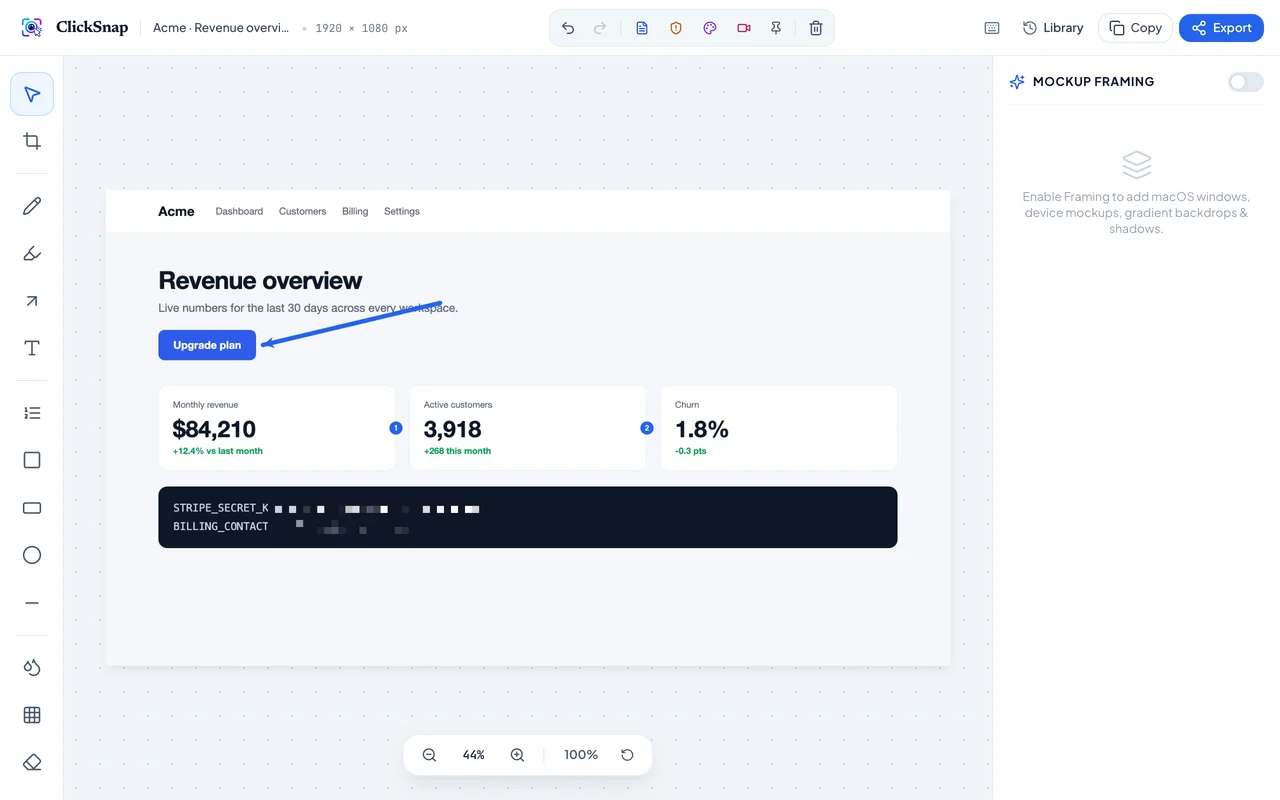
Modern vector studio instead of pixelated legacy tools
While competitors rely on 2012-era interfaces that clutter your captures, ClickSnap delivers a lightweight, ultra-responsive vector engine with sub-pixel rendering, numbered step counters, 3D device framing, and local OCR text extraction.
Ready to switch to ClickSnap today?
Experience seamless full-page scrolling, local OCR extraction, AI privacy auto-redact, 3D mockup frames, and airtight local privacy with zero subscription fees.